Stop spending days on manual SSIS migrations. SSIS Catalog Migration Wizard Pro moves your packages, environments, parameters, and permissions to any SQL Server — automatically, accurately, every time.
Disney
FedEx
KPMG
PACCAR
Moog Inc.
Meijer
Willis Towers Watson
Mayo Clinic
Rocket Mortgage
Equifax
PSEG
From a single folder to a full enterprise catalog — the Wizard handles every scenario, automatically.
Folders, .ispac files, environments, environment variables, project and package parameters, connection strings, and explicit permissions — migrated completely, in the right order.
Catch broken environment variable references and orphaned configurations before migration starts. Export a full inspection report as CSV to fix issues upstream.
All connections are direct SQL API calls within your own network — zero data ever leaves it. For airgapped or cross-domain moves, export the catalog to a .scmw file and import it on the target machine instead.
Automate SSISDB migrations and backups via command-line. Integrates with SQL Agent jobs, Azure DevOps, GitHub Actions, and any CI/CD scheduler — no UI required.
The wizard proactively suggests replacement values for connection strings, file paths, and credentials — so your packages run correctly in the target environment without manual edits.
Compare source and target SSISDB side by side. Green = new, red = changed. Migrate only what has changed — perfect for incremental dev-to-production deployments.
Follow the same simple workflow you'll use in the real application. Each step shows you exactly what to expect before you start.
Watch a Quick DemoSelect the SQL Server radio button and provide the SQL Server instance that hosts your SSISDB catalog.
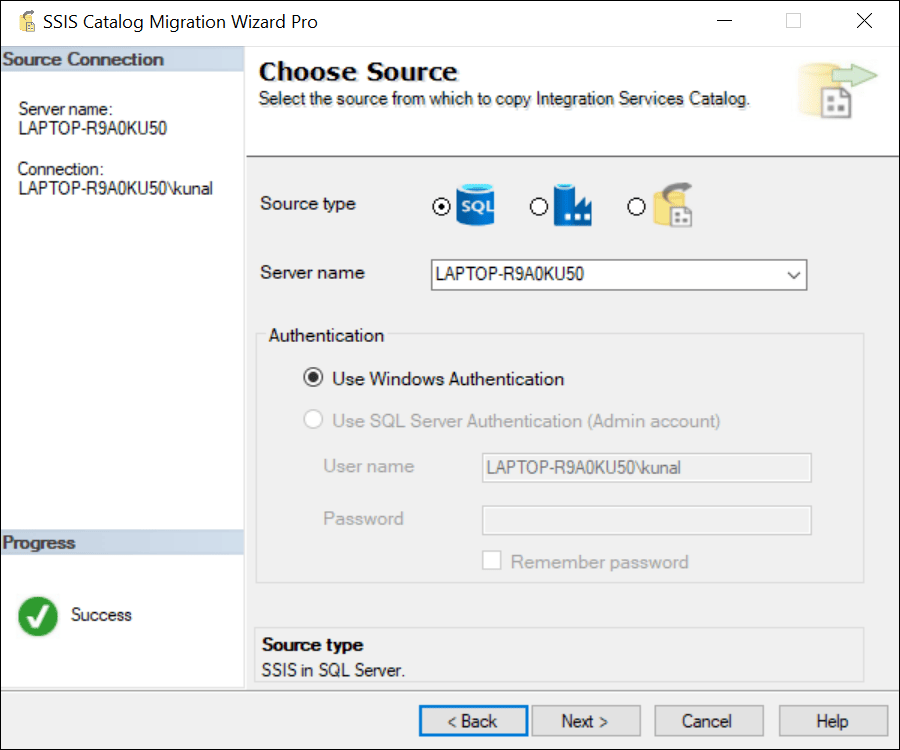
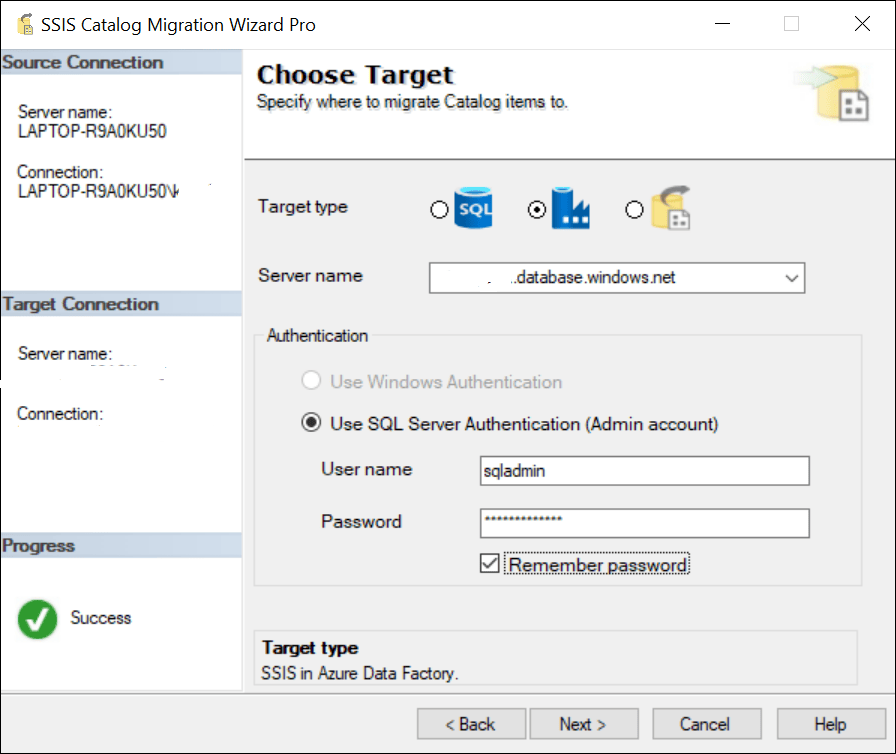
Select the Azure Data Factory radio button and point the wizard to the destination catalog for your SSIS projects.
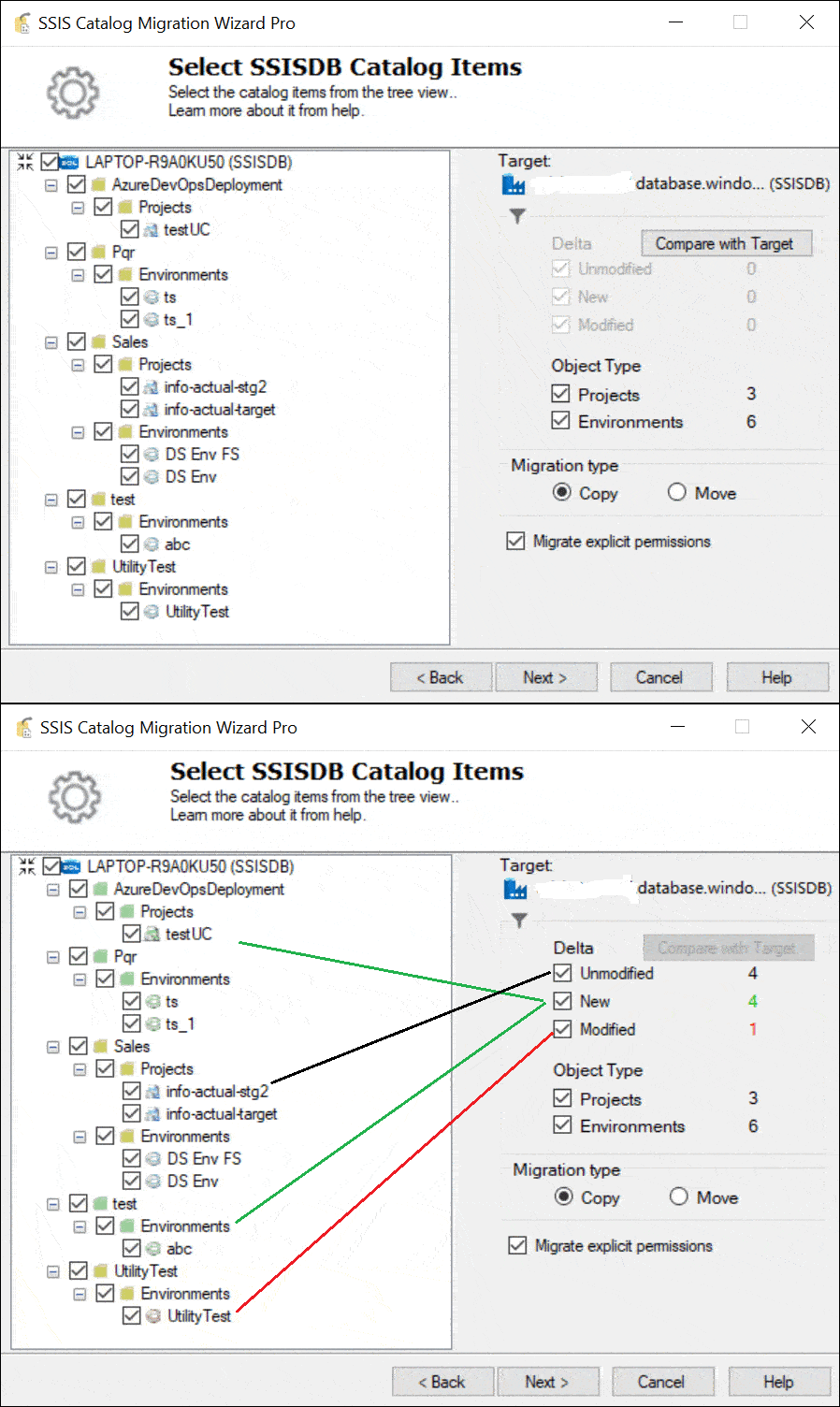
Browse the SSISDB catalog treeview and choose exactly which folders, projects and environments to move.
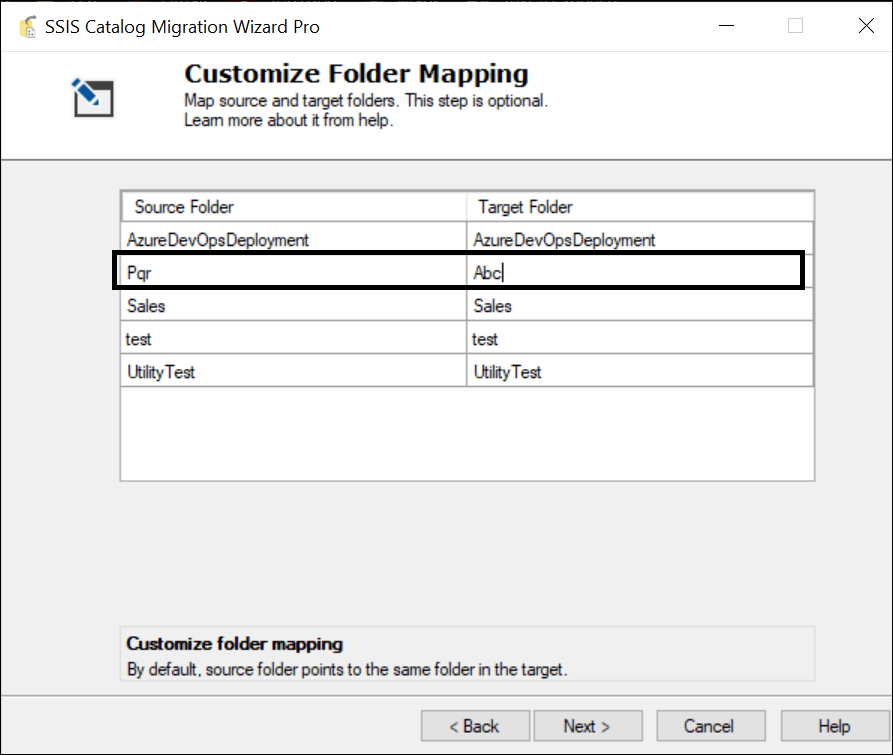
The wizard pre-populates source and target folder names — edit the Target Folder column to rename or consolidate as needed.
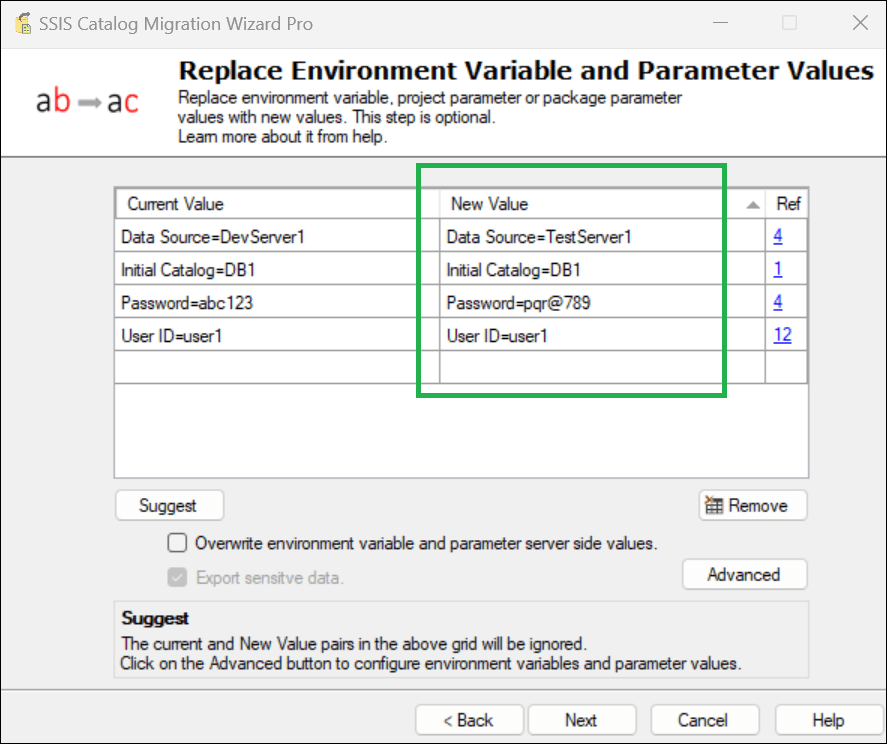
Configure key-value replacements so environment variables and project or package parameters line up with the target environment.
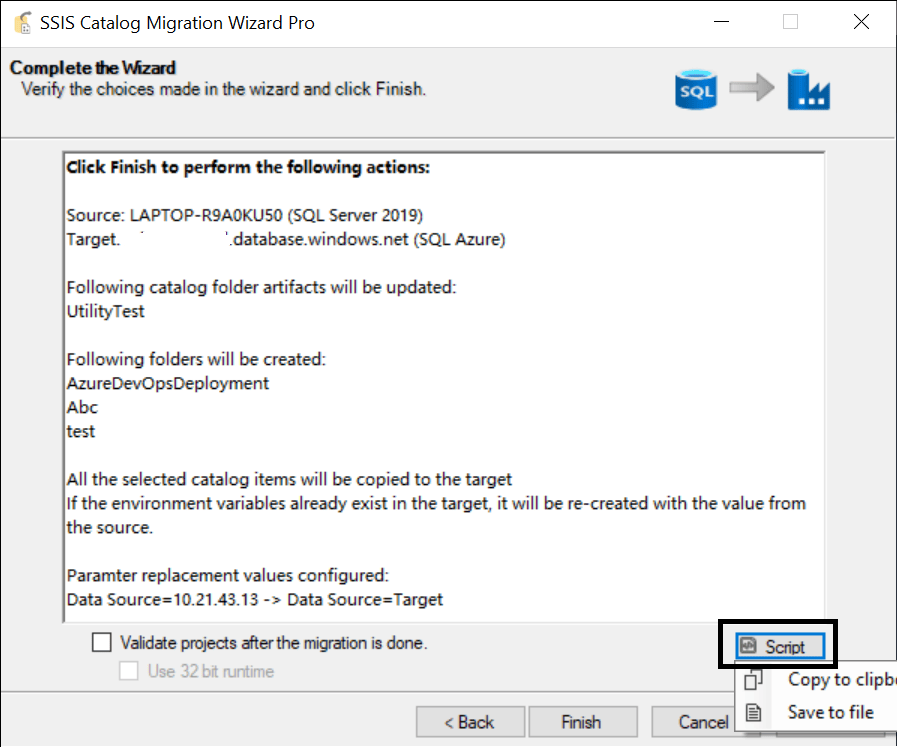
Before anything is committed to the target catalog, review the full deployment summary and make sure everything is ready.
The wizard performs the migration and reports results live — folder by folder — as the catalog is deployed to the target.

Real feedback from database administrators and IT teams running the wizard in production.
"Thank you to the AzureOps team and specifically Kunal for the assistance while utilizing this tool during our SSIS migration. While migrating hundreds of SSIS packages from SQL17 to SQL22 this tool was crucial to our successful production migration, and the AzureOps team always answered questions quickly and effectively."
"Thank you Kunal for your prompt response and support. The tool has been very helpful and saved us significant time during our SSIS migration to Azure."
"Very good product and customer support. Kunal has been particularly attentive to the feedback we provided during the trial period and helped us with a couple of minor config issues. I think the only area to improve is probably the error messages that are taken directly from SSIS engine."
"The tool is very simple to use. It has saved us a lot of time transferring our SSIS catalog to over a dozen new servers in our infrastructure."
"The migration tool is very intuitive and simple to use. It has saved us a lot of time transferring our SSIS infrastructure to a new server. Thanks Kunal for the fast and helpful support."
"I have got three SSISDBs to be migrated from SQL Server 2014 to SQL Server 2022. So far, I have migrated DEV environment and it went just fine. Thank you."
"Simple and intuitive use and excellent user experience. Does what it promises! Support is fast and available 24/7. For me the best tool I've ever tried."
"I have 5 older SQL Servers that I am migrating to newer versions and each has dozens of packages, if not more. This tool is a life saver. Thank you!!"
Annual and Perpetual plans include the SCMW command-line utility. Schedule migrations, run them in CI/CD pipelines, or automate nightly SSISDB backups — no UI required.
Works with SQL Agent jobs — schedule regular SSISDB backups or incremental deployments
Azure DevOps & GitHub Actions — integrate SSISDB deployment into your release pipeline
Selective item migration — specify exactly which folders, projects, and environments to migrate
Custom log file location — full execution logs saved to a path you specify for audit trails
# Full catalog migration, source → target SSIS.Cataloger.Pro.exe /st:0 /ssn:SourceServer /tt:0 /tsn:TargetServer # Export SSISDB to .scmw backup file SSIS.Cataloger.Pro.exe /st:0 /ssn:. /tt:2 \ /scmwfp:"D:\Backups\backup.scmw" # Selective migration + log output SSIS.Cataloger.Pro.exe /st:0 /ssn:SourceServer \ /tt:0 /tsn:TargetServer \ /items:"[{FolderName:Sales}]" \ /lfd:"D:\Logs"
Full CLI reference: ssiscataloger.azureops.org/automation →
All plans include the complete SSIS Catalog Migration Wizard feature set. Perpetual and Enterprise Perpetual unlock CLI automation for scripted, repeatable migrations.
SQL Server 2012, 2014, 2016, 2017, 2019, 2022, and 2025 — as source or target. Also supports Azure Data Factory SSIS Integration Runtime and Azure SQL Managed Instance.
One license per installation server. If your source and target SSISDB are both reachable from one machine, you only need one license. The tool grants multi-user access per server.
No. SSIS Catalog Migration Wizard works fully offline. All connections are direct SQL API calls within your own network. Zero data is ever sent to any external server.
Yes. Use the .scmw export format: export the source catalog to a file, copy it to the target network, and import it there. Install the tool on both machines.
Yes. The wizard handles encrypted connection manager properties and sensitive environment variables. Sensitive data export can also be controlled via settings.
Yes — exclusive discounts for educational institutions and non-profit organisations. Email support@azureops.org from your official address for the discount code.
Try free from Visual Studio Marketplace, or buy direct with our 100% money-back guarantee.
| Cookie | Duration | Description |
|---|---|---|
| cookielawinfo-checkbox-analytics | 11 months | This cookie is set by GDPR Cookie Consent plugin. The cookie is used to store the user consent for the cookies in the category "Analytics". |
| cookielawinfo-checkbox-functional | 11 months | The cookie is set by GDPR cookie consent to record the user consent for the cookies in the category "Functional". |
| cookielawinfo-checkbox-necessary | 11 months | This cookie is set by GDPR Cookie Consent plugin. The cookies is used to store the user consent for the cookies in the category "Necessary". |
| cookielawinfo-checkbox-others | 11 months | This cookie is set by GDPR Cookie Consent plugin. The cookie is used to store the user consent for the cookies in the category "Other. |
| cookielawinfo-checkbox-performance | 11 months | This cookie is set by GDPR Cookie Consent plugin. The cookie is used to store the user consent for the cookies in the category "Performance". |
| viewed_cookie_policy | 11 months | The cookie is set by the GDPR Cookie Consent plugin and is used to store whether or not user has consented to the use of cookies. It does not store any personal data. |