
SSIS Catalog Migration Wizard includes a command-line utility for automating catalog migrations and inspection tasks. Scripts can be integrated with Windows Task Scheduler or CI/CD tools.
Executable #
The command-line utility is SSISCataloger.Pro.exe. Add its folder to the Windows Path environment variable or call the executable using its full path.
Command-Line Parameters #
| Parameter | Requirement | Description |
|---|---|---|
st |
Required | Source type: 0 = SQL Server, 1 = Azure SSIS IR, 2 = SCMW file. |
ssn |
When st=0 |
Source SQL Server instance name. |
su, sp |
When st=1 |
Administrator username and password for the Azure SQL Server containing the SSIS IR. |
tt |
Required | Target type: 0 = SQL Server, 1 = Azure SSIS IR, 2 = SCMW file. |
tsn |
When tt=0 |
Target SQL Server instance name. |
tu, tp |
When tt=1 |
Administrator username and password for the Azure SQL Server containing the target SSIS IR. |
scmwfp |
When source or target is SCMW | Full path to the SCMW file. |
opr |
Optional | Operation: migrate or inspect. Default is migrate; documented as preview in the source documentation. |
items |
Optional | JSON selection of catalog folders, projects, and environments. If omitted, the full source catalog is selected. |
mt |
Optional | Migration type: copy (default) or move. Move deletes selected items from the source. |
fm |
Optional | JSON mapping of source folder names to target folder names. |
oev |
Optional | true or false. When true, target environment variables are recreated based on source variables. Default is false. |
lfd |
Optional | Directory for execution logs and errors. If omitted, the application uses its default log location. |
Automate SSIS Deployment #
Examples #
Export an Entire Catalog to an SCMW File #
"C:\SSIS Cataloger Pro\SSIS.Cataloger.Pro.exe" /st:0 /ssn:. /tt:2 /scmwfp:"D:\SCMW exports\Export.scmw"Import Selected Items and Map a Folder #
SSIS.Cataloger.Pro.exe /st:2 /scmwfp:"D:\SCMW exports\Export.scmw" /tt:0 /tsn:TargetServer /items:"[{"FolderName":"Azure test","Projects":[],"Environments":["env1"]},{"FolderName":"Sales","Projects":["sales-stg2"],"Environments":[]}]" /fm:"{"Azure test":"Azure prod"}"Migrate Selected Items to Another SQL Server #
SSIS.Cataloger.Pro.exe /st:0 /ssn:SourceServer /tt:0 /tsn:TargetServer /items:"[{"FolderName":"Azure test","Projects":["testUC"],"Environments":["env1"]}]" /lfd:"D:\SCMW exports"Inspect a Catalog #
"C:\SSIS Cataloger Pro\SSIS.Cataloger.Pro.exe" /st:0 /ssn:SourceServer /opr:inspect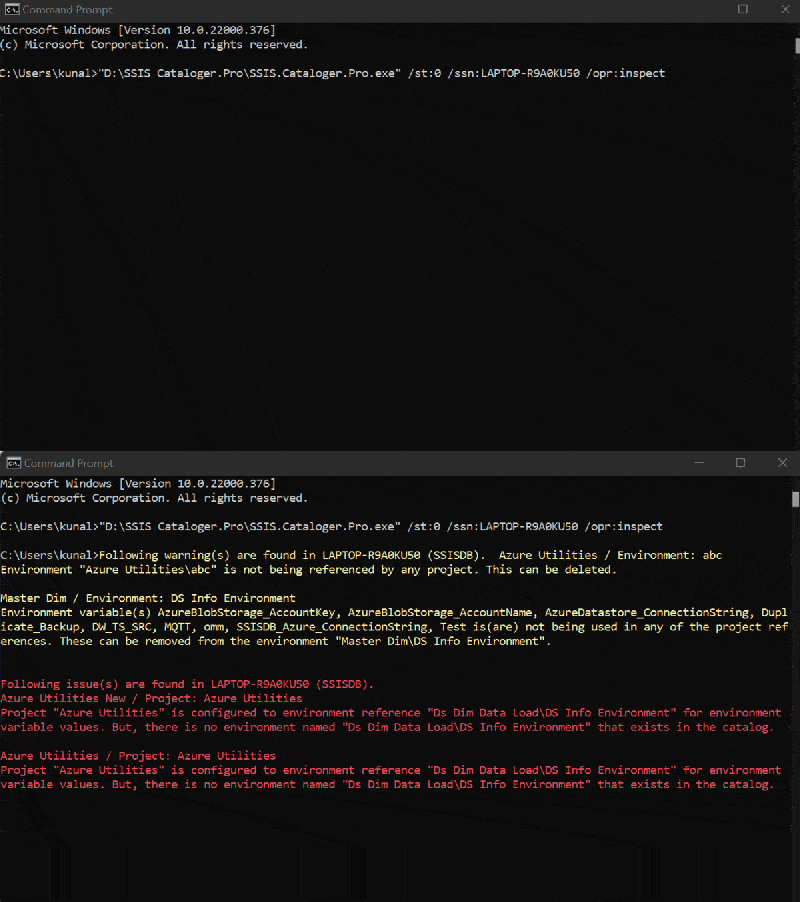
Exit Codes #
0— Success.-1— Failure.
Operational Notes #
- Test automation against a non-production catalog before scheduling production runs.
- Review logs and exit codes after each execution.
- Use
moveonly when source deletion is intended. - Protect command-line arguments, log files, and SCMW files if they contain credentials or sensitive values.
Automation examples should be reviewed against the installed product version before production use.