Quick answer: To deploy Azure SQL external tables through an Azure DevOps pipeline, replace hardcoded credential and data source values with SQLCMD variables, store the real values in Azure Key Vault, and pass them to SqlPackage using the /v: switch on the SqlAzureDacpacDeployment task.
In an earlier post, we walked through setting up a full Azure DevOps CI/CD pipeline to deploy a DACPAC to Azure SQL Database. We covered how to set up cross-database queries in Azure SQL using external tables, also known as Elastic Query. Both are common asks, but a question that comes up right after is: how do you deploy external tables and their supporting objects (master key, credential, external data source) through the same pipeline, without hardcoding server names, database names, and passwords into your .sqlproj?
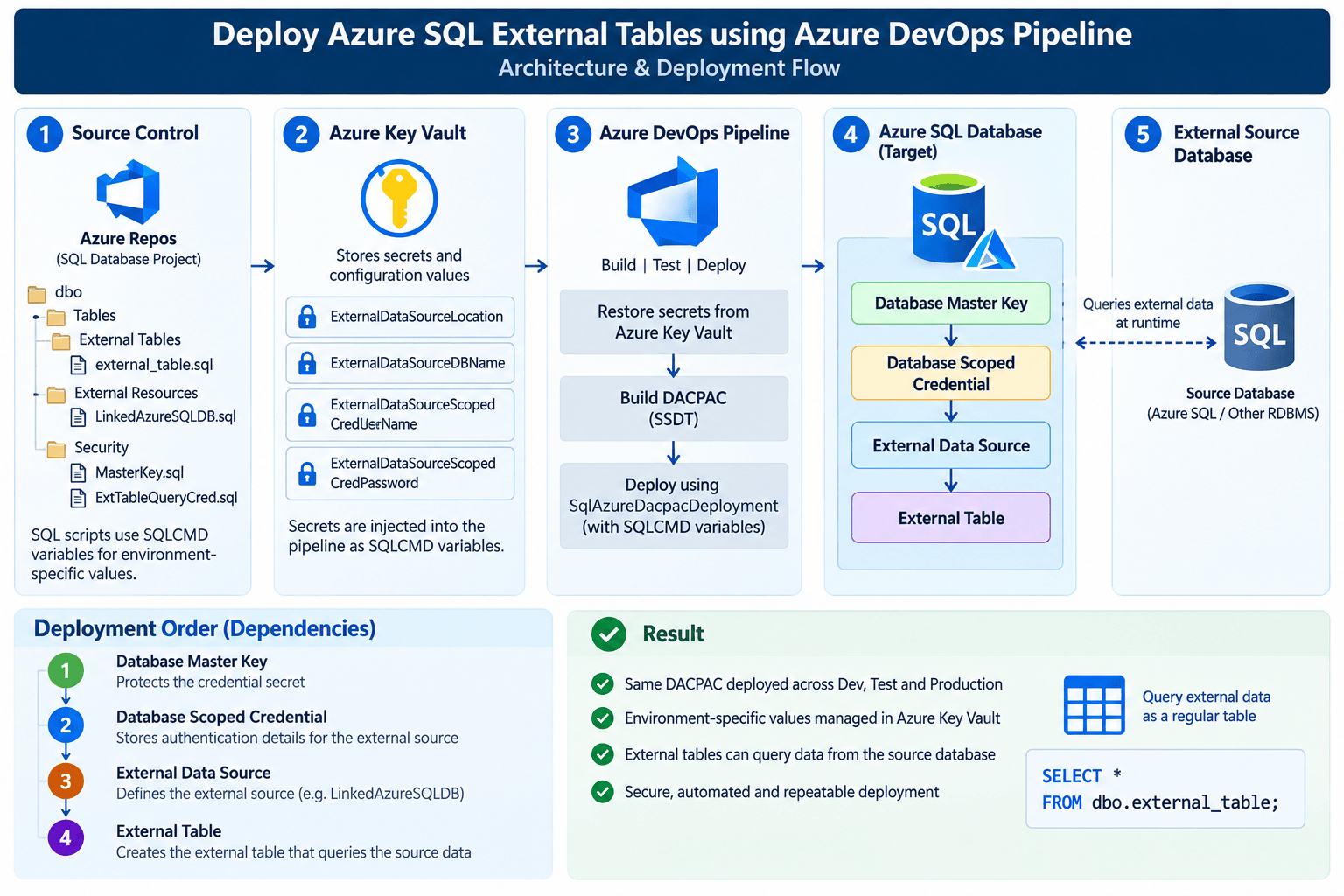
This post bridges the two. We’ll take the manual external table setup and turn it into SQLCMD-variable-driven objects in the database project, source their values from Azure Key Vault, and pass them into the SqlAzureDacpacDeployment task so the same DACPAC can be deployed safely across dev, test, and prod — each pointing to a different source database.
Prerequisites:
1. A working Azure SQL CI/CD pipeline, as covered in this post, with Key Vault access already wired into the pipeline.
2. A database project containing (or about to contain) external table objects, as covered in cross-database query in Azure SQL Database post.
3. Secrets for the source database connection already created in Azure Key Vault, see this article if you haven’t set this up yet.
Why Not Hardcode External Data Source Values?
The CREATE EXTERNAL DATA SOURCE and CREATE DATABASE SCOPED CREDENTIAL statements need a server name, database name, username, and password. If you hardcode these into the .sql files in your database project, you run into two problems the moment you promote the DACPAC beyond one environment:
- Different source servers per environment — your dev database usually points to a dev source database, not the prod one, so the location and database name in the script need to change per stage.
- Secrets in source control — a credential password checked into a
.sqlfile in Azure Repos defeats the purpose of using Key Vault everywhere else in the pipeline.
The fix is the same pattern SqlPackage already uses for connection strings: SQLCMD variables in the project, resolved at publish time from pipeline variables that are themselves sourced from Key Vault or a variable group.
Step 1: Parameterize the External Table Objects in the Database Project
In your database project, replace the hardcoded values in the master key, credential, and external data source scripts with SQLCMD variables:
CREATE MASTER KEY ENCRYPTION BY PASSWORD ='$(Masterkey)';
CREATE DATABASE SCOPED CREDENTIAL [ExtTableQueryCred]
WITH
    IDENTITY = '$(ExternalDataSourceScopedCredUserName)',
    SECRET = '$(ExternalDataSourceScopedCredPassword)';
CREATE EXTERNAL DATA SOURCE [LinkedAzureSQLDB]
    WITH (
    TYPE = RDBMS,
    LOCATION = '$(ExternalDataSourceLocation)',
    DATABASE_NAME = '$(ExternalDataSourceDBName)',
    CREDENTIAL = [ExtTableQueryCred]
    );
When Visual Studio sees a $(variableName) token in a script, it recognizes it as a SQLCMD variable reference. You can confirm this under Properties > SQLCMD Variables.
If the variables are not automatically added, add them manually by clicking the empty row and entering the variable names used in your scripts.
Ensure the names match your SQL scripts exactly. Default values are useful for local publishes, but never store real passwords in the project.

Note: Name the credential and data source objects deterministically (as shown above), not with environment-specific suffixes. The object name stays constant across dev/test/prod — only the SQLCMD variable values change per environment.
Once the credential and data source exist, the external table itself doesn’t need any environment-specific values, it just references the data source by name, so it deploys unchanged across every stage:
CREATE EXTERNAL TABLE [dbo].[external_table]
(
    -- column definitions matching the source table
)
WITH (
    DATA_SOURCE = [LinkedAzureSQLDB],
    SCHEMA_NAME = 'dbo',
    OBJECT_NAME = 'external_table'
);
Step 2: Store the Variable Values in Key Vault / Variable Groups
Following the pattern from the CI/CD pipeline post, add each of these as a secret in your environment-specific Key Vault (or as a secret variable group linked to Key Vault):
| Key Vault secret name | Maps to SQLCMD variable | Example value |
|---|---|---|
externalDataSourceLocation | ExternalDataSourceLocation | source-server.database.windows.net |
externalDataSourceDBName | ExternalDataSourceDBName | source-db |
externalDataSourceScopedCredUserName | ExternalDataSourceScopedCredUserName | ext_table_user |
externalDataSourceScopedCredPassword | ExternalDataSourceScopedCredPassword | (secret) |
masterkey | Masterkey | (secret, only needed the first time a master key is created in a database) |
Add these secret names to the SecretsFilter of the AzureKeyVault@1 task for each stage, right alongside the azuresqldb-dbconnstring secret you’re already pulling in.
Step 3: how do you pass Key Vault variables to SqlPackage?
SqlPackage exposes SQLCMD variables through the /v: switch. Extend the AdditionalArguments property on the SqlAzureDacpacDeployment@1 task to pass each variable through from the pipeline:
AdditionalArguments: '/p:GenerateSmartDefaults=True /p:DropObjectsNotInSource=false /p:BlockOnPossibleDataLoss=true /p:IgnorePermissions=true /p:ExcludeObjectTypes="Users;Permissions" /v:ExternalDataSourceLocation=$(externalDataSourceLocation) /v:ExternalDataSourceDBName=$(externalDataSourceDBName) /v:ExternalDataSourceScopedCredUserName=$(externalDataSourceScopedCredUserName) /v:ExternalDataSourceScopedCredPassword=$(externalDataSourceScopedCredPassword) /v:Masterkey=$(masterKey)'
A couple of things worth calling out here:
- Every
/v:entry maps a SQLCMD variable name (left of the=) to a pipeline variable (right of the=, in$(...)form). The pipeline variable, in turn, resolves from the Key Vault secret you pulled in withAzureKeyVault@1. /p:GenerateSmartDefaults=Truetells SqlPackage to auto-generate values for any NOT NULL columns it can’t otherwise resolve during publish — useful the first time you’re adding columns to existing tables alongside the external table changes, but exercise it with the same caution as theDropObjectsNotInSourceflag we called out in the CI/CD pipeline post.- If your database doesn’t have a master key yet, keep the
/v:masterkey=$(masterkey)argument in the list too. Once the master key exists,CREATE MASTER KEYis safe to leave in the script — SqlPackage/SSDT will skip re-running it, but it’s still good practice to guard it in code review.
Step 4: Wire it into the environment Stage
Here’s how this slots into the stage-per-environment pipeline from the earlier post — only the AzureKeyVault@1 and SqlAzureDacpacDeployment@1 steps change:
- stage: dev
  displayName: Dev Deploy Stage
  dependsOn: build
  condition: and(succeeded(), ne(variables['Build.Reason'], 'PullRequest'))
  jobs:
  - deployment: Deploy
    displayName: Deploy Dev
    pool:
      vmImage: $(vmImageName)
    environment: dev
    strategy:
      runOnce:
        deploy:
          steps:
          - task: AzureKeyVault@1
            inputs:
              AzureSubscription: 'dev-service-connection-name'
              KeyVaultName: 'dev-keyva'
              SecretsFilter: 'azuresqldb-dbconnstring, externalDataSourceLocation, externalDataSourceDBName, externalDataSourceScopedCredUserName, externalDataSourceScopedCredPassword, masterkey'
              RunAsPreJob: true

          - task: SqlAzureDacpacDeployment@1
            inputs:
              AzureSubscription: 'dev-service-connection-name'
              AuthenticationType: 'connectionString'
              ConnectionString: '$(azuresqldb-dbconnstring)'
              DeployType: 'DacpacTask'
              DeploymentAction: 'Publish'
              DacpacFile: '$(Pipeline.Workspace)/drop/s/AzureOps.Sql/bin/Release/AzureOps.Sql.dacpac'
              AdditionalArguments: '/p:GenerateSmartDefaults=True /p:DropObjectsNotInSource=false /p:BlockOnPossibleDataLoss=true /p:IgnorePermissions=true /p:ExcludeObjectTypes="Users;Permissions" /v:ExternalDataSourceLocation=$(externalDataSourceLocation) /v:ExternalDataSourceDBName=$(externalDataSourceDBName) /v:ExternalDataSourceScopedCredUserName=$(externalDataSourceScopedCredUserName) /v:ExternalDataSourceScopedCredPassword=$(externalDataSourceScopedCredPassword) /v:Masterkey=$(masterkey)'
              IpDetectionMethod: 'AutoDetect'
Repeat the same pattern for test and prod, pointing KeyVaultName and the secret values at each environment’s own source database, this is exactly why the external data source location and database name are variables rather than constants in the script.
Step 5: Verify the Deployment
Run the pipeline and confirm two things:
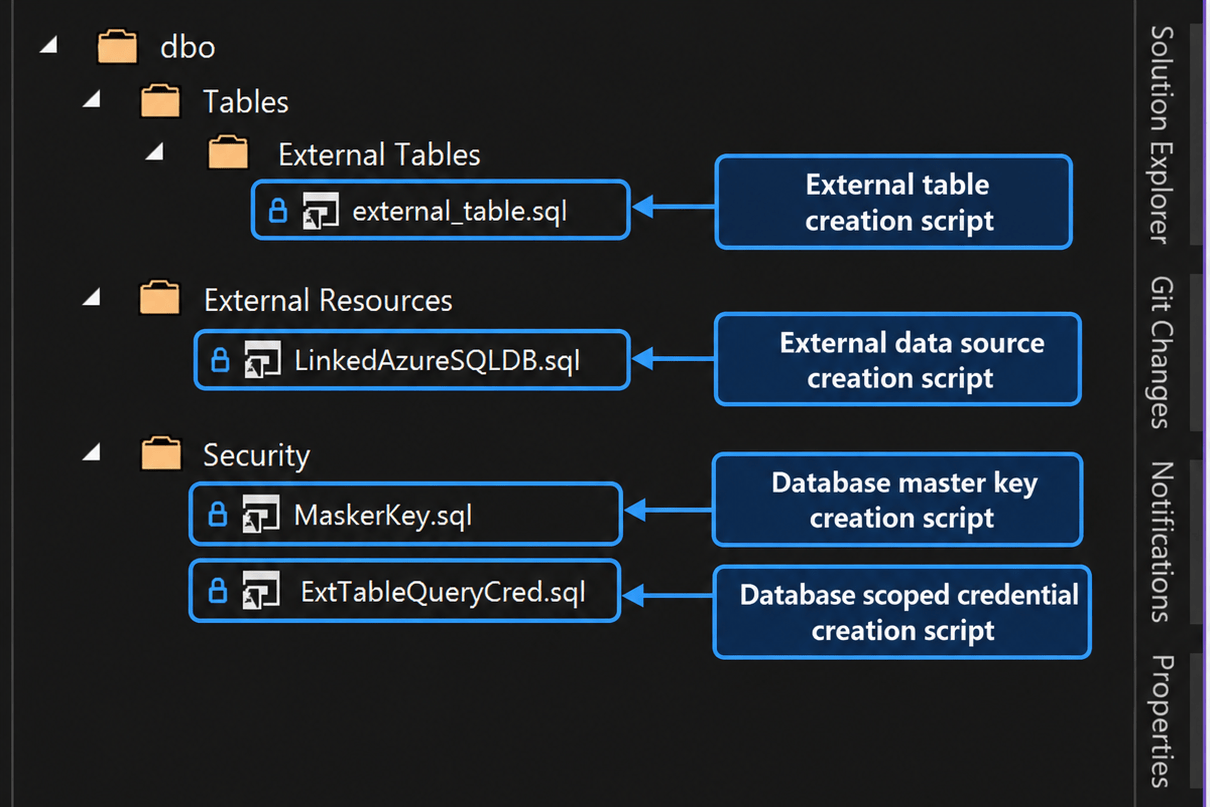
- In Solution Explorer, after a successful build, the
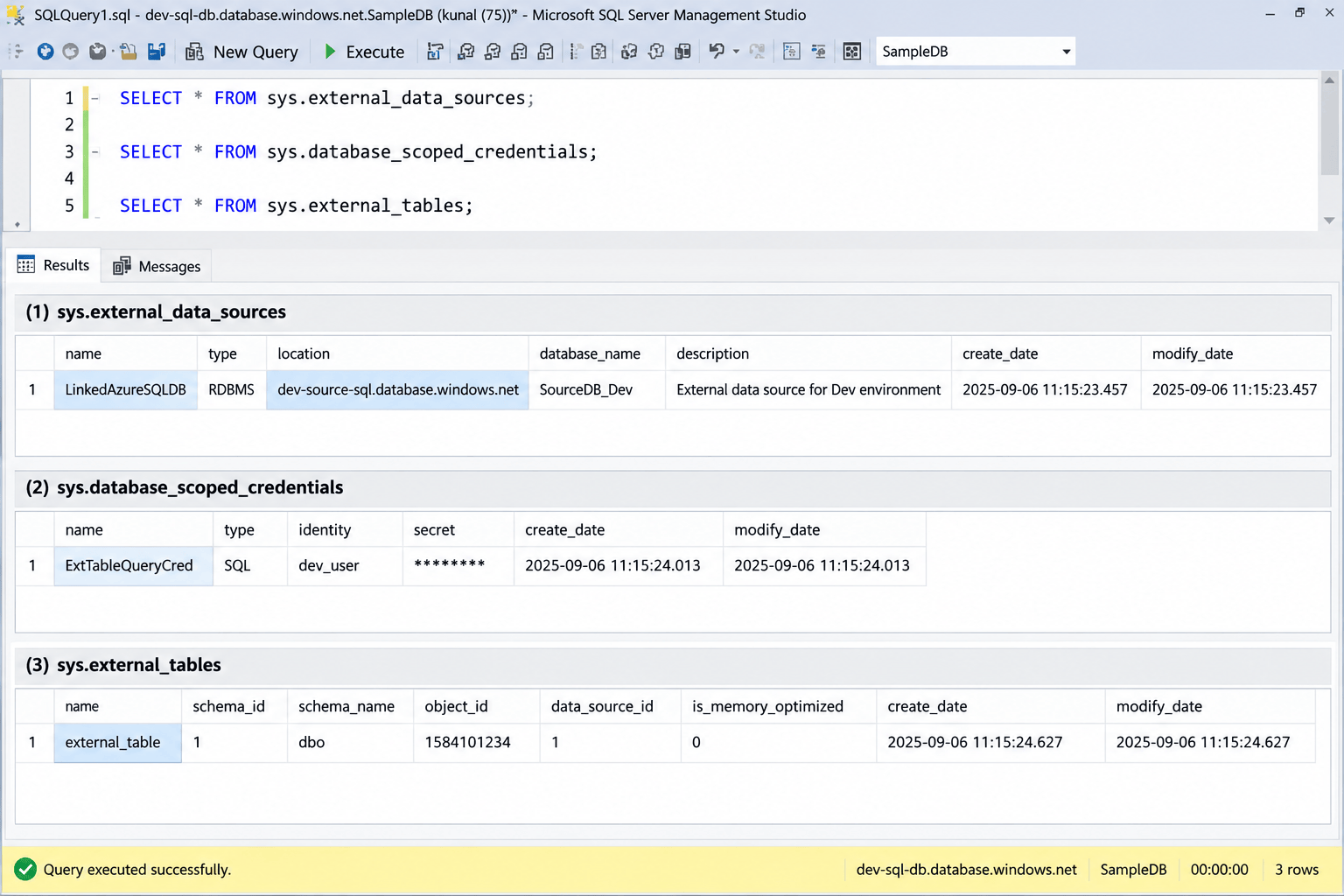
dbo > Tables > External Tablesnode, theExternal Resourcesnode, and theSecuritynode should all show the objects you parameterized, this is what confirms SSDT picked up the SQLCMD variables correctly at build time. - In the target database, query the catalog views to confirm the objects landed with the right values for that environment:
SELECT * FROM sys.external_data_sources;
SELECT * FROM sys.database_scoped_credentials;
SELECT * FROM sys.external_tables;
Wrapping Up
With the master key, scoped credential, and external data source parameterized as SQLCMD variables — and those values sourced from Key Vault the same way your connection string already is — external table deployment becomes just another part of the same CI/CD pipeline you already trust for the rest of your schema. No more running CREATE EXTERNAL DATA SOURCE by hand in SSMS per environment, and no credentials sitting in a .sql file in source control.
If you haven’t set up the base pipeline yet, start with Implement Azure SQL Database Deployment CI/CD Pipeline, and if you need a refresher on the external table / Elastic Query concepts themselves, revisit Cross Database Query in Azure SQL Database.
Pro tips:
1. Keep credential names environment-agnostic. Only the SQLCMD variable values should differ between dev/test/prod — renaming the credential or data source object per environment forces you to also edit the external table’s DATA_SOURCE reference per environment, which defeats the point of parameterizing.
2. Scope the pipeline identity, not just the SQL user. The service connection used to run SqlAzureDacpacDeployment@1 only needs deployment rights on the target database — it never touches the source database directly. Access to the source data flows entirely through the scoped credential, so keep ext_table_user‘s permissions on the source limited to SELECT on the specific tables it needs, as covered in the cross-database query post.
3. Mask the credential password variable. Mark it as a secret variable (or let it come through as a Key Vault secret, which is masked by default) so it never shows up in pipeline logs even if AdditionalArguments gets echoed during a failed run.
4. Rotating the source password? Update the Key Vault secret and re-run the pipeline — CREATE DATABASE SCOPED CREDENTIAL will be republished with ALTER semantics by SqlPackage, so you don’t need a separate rotation script.
5. Watch DropObjectsNotInSource. If you flip this to true for cleanup, make sure your external tables are actually present in the DACPAC’s source — a scoped credential or external table missing from the project because it was created manually will get silently dropped on the next deploy.
See more

Kunal Rathi
With over 15 years of experience in data engineering and analytics, I've assisted countless clients in gaining valuable insights from their data. As a dedicated supporter of Data, Cloud and DevOps, I'm excited to connect with individuals who share my passion for this field. If my work resonates with you, we can talk and collaborate.