Quick answer: A system-assigned managed identity is created as part of an Azure resource and shares that resource’s lifecycle. A user-assigned managed identity is a standalone Azure resource that can be assigned to multiple supported Azure resources and managed independently.
Azure managed identities allow Azure resources and applications to authenticate to supported Azure services without storing passwords, client secrets, or certificates in application code. Azure supports two managed identity types: system-assigned and user-assigned.
System-assigned vs user-assigned managed identity
| Feature | System-assigned | User-assigned |
|---|---|---|
| Creation | Created with an Azure resource | Created as a separate Azure resource |
| Lifecycle | Tied to the Azure resource | Independent of the Azure resource |
| Sharing | Associated with one resource | Can be assigned to multiple supported resources |
| Deletion | Deleted when the associated resource is deleted | Deleted separately |
| Management | Managed with the parent resource | Managed independently |
| Typical use | One workload/resource | Shared or independently managed workload identity |
What is a system-assigned managed identity?
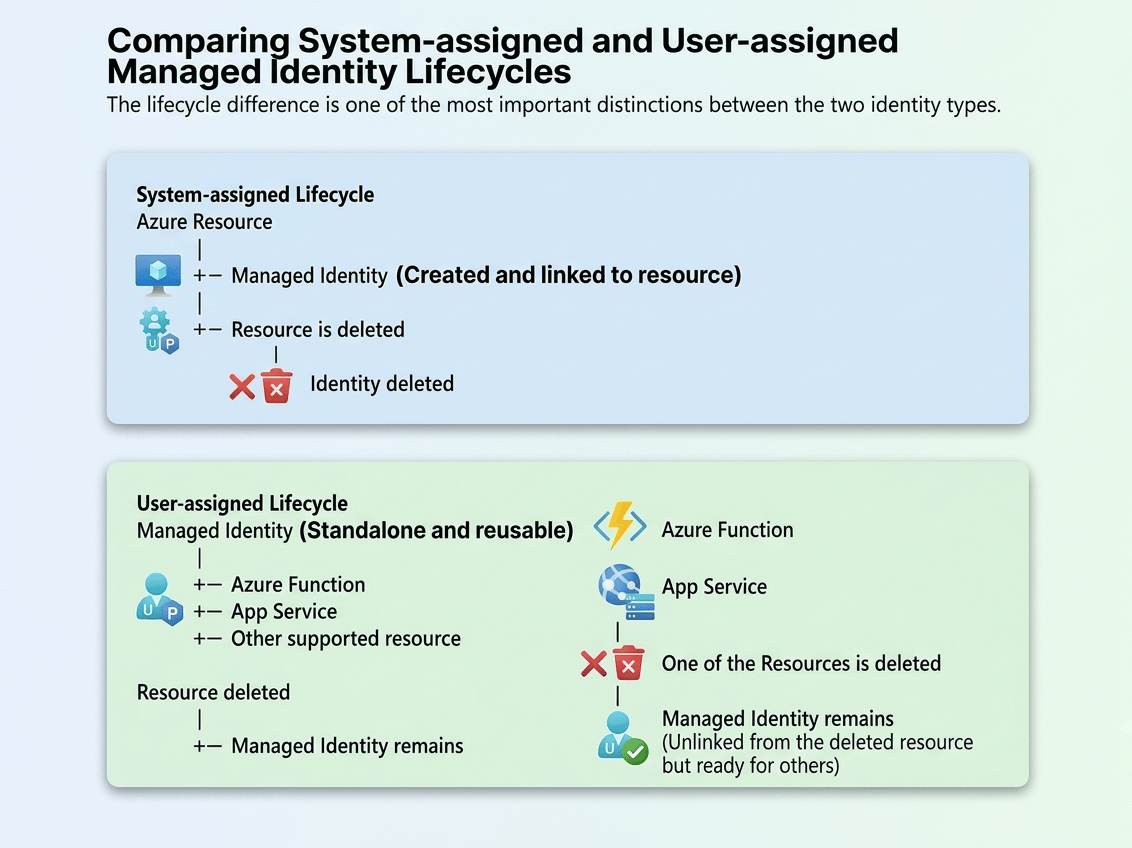
A system-assigned managed identity is created directly on a supported Azure resource. The identity is tied to that resource’s lifecycle. If the resource is deleted, its system-assigned identity is also deleted.
For example, an Azure Function can use its system-assigned managed identity to access Azure Key Vault without storing a Key Vault credential in application settings.
What is a user-assigned managed identity?
A user-assigned managed identity is a standalone Azure resource. You create it separately and then assign it to one or more supported Azure resources.
Its lifecycle is independent from the resources that use it. This makes it useful when an identity needs to survive resource replacement or be shared by multiple supported resources.
When should you use a system-assigned managed identity?
- One Azure resource needs access to another Azure service.
- The identity should follow the resource lifecycle.
- The identity does not need to be reused by other resources.
- You want the simplest identity setup for a single workload.
When should you use a user-assigned managed identity?
- Multiple supported Azure resources need to use the same identity.
- The identity needs an independent lifecycle.
- An application resource may be replaced during deployment.
- You want to provision identity separately from application resources.
- The Azure service or scenario specifically requires a user-assigned identity.
The lifecycle difference is one of the most important distinctions between the two identity types.
Microsoft currently recommends user-assigned managed identities for most scenarios when the Azure resource supports them. System-assigned identities remain useful when each resource should have its own identity and the identity should follow that resource’s lifecycle.
Managed identity with Azure SQL Database
Managed identities can be used with Microsoft Entra authentication for Azure SQL Database in supported scenarios. The identity must be granted the required permissions in the target database.
For example, an application can connect to Azure SQL using its managed identity instead of storing a SQL password in configuration. For a practical Azure SQL example, see Connect Azure SQL from Data Factory using Managed Identity.
Managed identity with Azure Key Vault
Managed identities are commonly used to allow Azure applications to retrieve secrets from Azure Key Vault without embedding credentials in application code. For an Azure Data Factory example, see How to Use Azure Key Vault Secrets in Azure Data Factory.

How to create a user-assigned managed identity
In the Azure portal, open Managed Identities and select Create. Select the subscription and resource group, provide a name and region, and then select Review + create followed by Create.

After the identity is created, assign it to supported Azure resources and grant it only the permissions required by the workload. Read more about creating a user-assigned managed identity in this step-by-step guide.
Common mistakes
- Granting permissions to the wrong identity: Verify which managed identity the application actually uses.
- Confusing client ID and principal ID: The
clientIdidentifies the managed identity for authentication scenarios, while theprincipalIdidentifies the Microsoft Entra service principal object used when assigning permissions. - Assuming every Azure service supports both types: Support varies by service and scenario.
- Deleting a resource without checking its identity: A system-assigned identity is deleted with its resource.
- Granting excessive permissions: Follow least-privilege principles.
FAQ
What is the difference between system-assigned and user-assigned managed identity?
A system-assigned identity is tied to an Azure resource’s lifecycle. A user-assigned identity is a separate Azure resource with an independent lifecycle and can be assigned to multiple supported resources.
Can a user-assigned managed identity be used by multiple Azure resources?
Yes. A user-assigned managed identity can be associated with multiple supported Azure resources.
What happens to a system-assigned managed identity when the resource is deleted?
The system-assigned identity is deleted with the associated resource.
Does a user-assigned managed identity get deleted when a resource is deleted?
No. The user-assigned identity has an independent lifecycle and must be deleted separately.
Which managed identity should I use?
It depends on the Azure service and application architecture. A system-assigned identity fits an identity that belongs to one resource, while a user-assigned identity fits scenarios requiring an independent lifecycle or reuse across supported resources.
Pro tips:
1. Use a system-assigned identity when the identity should follow one Azure resource’s lifecycle.
2. Use a user-assigned identity when the identity needs an independent lifecycle or must be reused.
3. Grant only the permissions required by the workload.
4. Check the Azure service documentation because managed identity support varies by service and scenario.
5. For Azure SQL access, see How to Grant Access to Azure SQL Database.
See more

Kunal Rathi
With over 15 years of experience in data engineering and analytics, I've assisted countless clients in gaining valuable insights from their data. As a dedicated supporter of Data, Cloud and DevOps, I'm excited to connect with individuals who share my passion for this field. If my work resonates with you, we can talk and collaborate.