Need to find long-running queries in Azure SQL Database? You can use sys.dm_exec_requests with sys.dm_exec_sessions and sys.dm_exec_sql_text to see currently running requests, their duration, CPU usage, reads, writes, and the SQL text.
This query is useful when a query is running right now and you want to quickly identify what is consuming database resources.
Find Long Running Queries in Azure SQL Database
The following query returns requests that have been running for at least 60 seconds. Change the 60000 value if you want a different threshold.
-- Find currently running queries that have been running for at least 60 seconds.

SELECT
    r.session_id,
    r.status,
    r.command,
    r.start_time,
    r.total_elapsed_time,
    r.cpu_time,
    r.percent_complete,
    SUBSTRING(qt.text, (r.statement_start_offset / 2) + 1,
        ((CASE r.statement_end_offset
            WHEN -1 THEN DATALENGTH(qt.text)
            ELSE r.statement_end_offset
          END - r.statement_start_offset) / 2) + 1) AS query_text,
    s.host_name,
    s.login_name,
    s.program_name,
    r.database_id,
    DB_NAME(r.database_id) AS database_name,
    r.reads,
    r.writes,
    r.logical_reads
FROM
    sys.dm_exec_requests AS r
JOIN
    sys.dm_exec_sessions AS s
    ON r.session_id = s.session_id
CROSS APPLY
    sys.dm_exec_sql_text(r.sql_handle) AS qt
WHERE
    r.session_id <> @@SPID
    AND r.total_elapsed_time >= 60000
ORDER BY
    r.total_elapsed_time DESC;
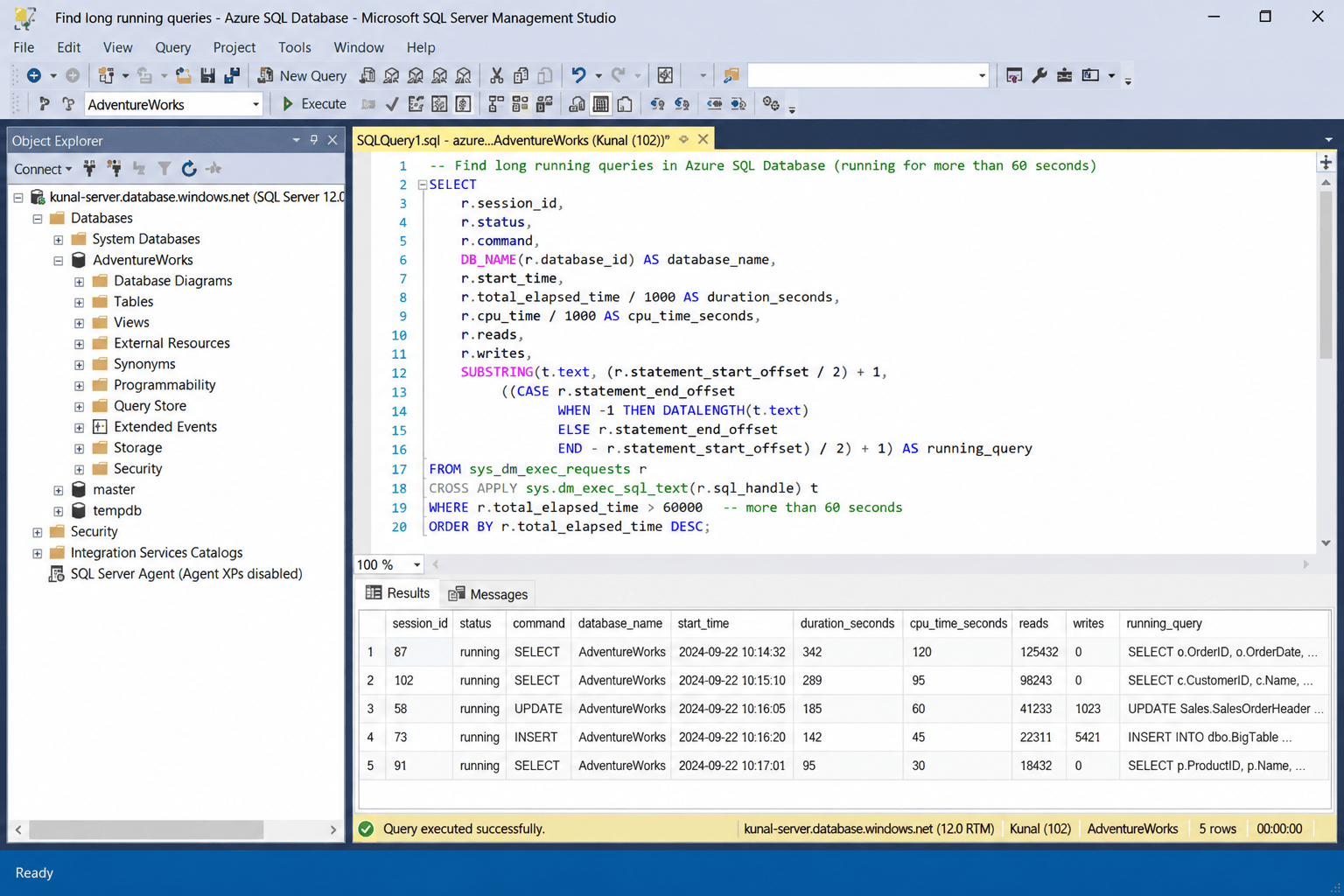
What does this query show?
The query combines three SQL Server dynamic management views (DMVs):
- sys.dm_exec_requests — information about requests that are currently executing.
- sys.dm_exec_sessions — session details such as login, host, and application.
- sys.dm_exec_sql_text — the SQL text associated with the request.
The total_elapsed_time, cpu_time, reads, writes, and logical_reads columns help you identify whether a long-running request is also consuming significant CPU or I/O resources.
Current vs. historical long-running queries
The DMV query above only helps with requests that are currently running. For queries that already finished, use Query Performance Insight or Query Store to review query duration and other runtime statistics over time.
Pro Tips:
1. Run DMV queries with appropriate permissions and avoid repeatedly polling them at a high frequency in production.
2. If a query is long-running because of blocking, also check the blocking session and wait information.
3. For ongoing performance analysis, Query Store is more useful than a DMV snapshot because it retains historical runtime information.
See more

Visual Studio Marketplace
SSIS Catalog Migration Wizard
Extend Visual Studio with an easy way to migrate SSIS Catalog projects.

Kunal Rathi
With over 15 years of experience in data engineering and analytics, I've assisted countless clients in gaining valuable insights from their data. As a dedicated supporter of Data, Cloud and DevOps, I'm excited to connect with individuals who share my passion for this field. If my work resonates with you, we can talk and collaborate.